
Three9 Billing · Retail software
Billing that keeps working when the internet doesn't.
Scan, bill and print a receipt with a UPI QR in seconds. Stock, customers and sales update on their own, and every bill is saved on the device first, so power cuts and outages don't lose a sale.
- Works offline
- Phone camera or USB scanner
- 48 mm receipts with UPI QR
- Barcode billing
- Phone camera scanning
- UPI QR receipts
- Works offline
- Live stock
- Low-stock alerts
- Price categories
- Barcode labels
- Customer history
- Sales dashboard
- Multi-device sync
How a sale works
From scan to paid in under a minute.
One screen at the counter. Everything else, from stock to reports, updates by itself.
- ScanScan the tag with a USB scanner or phone camera, or type the item name.
- AdjustChange quantities, add a discount and pick the payment mode. Regulars are recognised by phone.
- PrintOne tap prints a 48 mm receipt and saves the bill.
- Get paidThe customer scans the UPI QR with the exact amount already filled in.
- DoneStock, customer history and today's sales update on their own.
Features
Everything a shop counter needs.
Screens below show Three9 Billing with sample data.
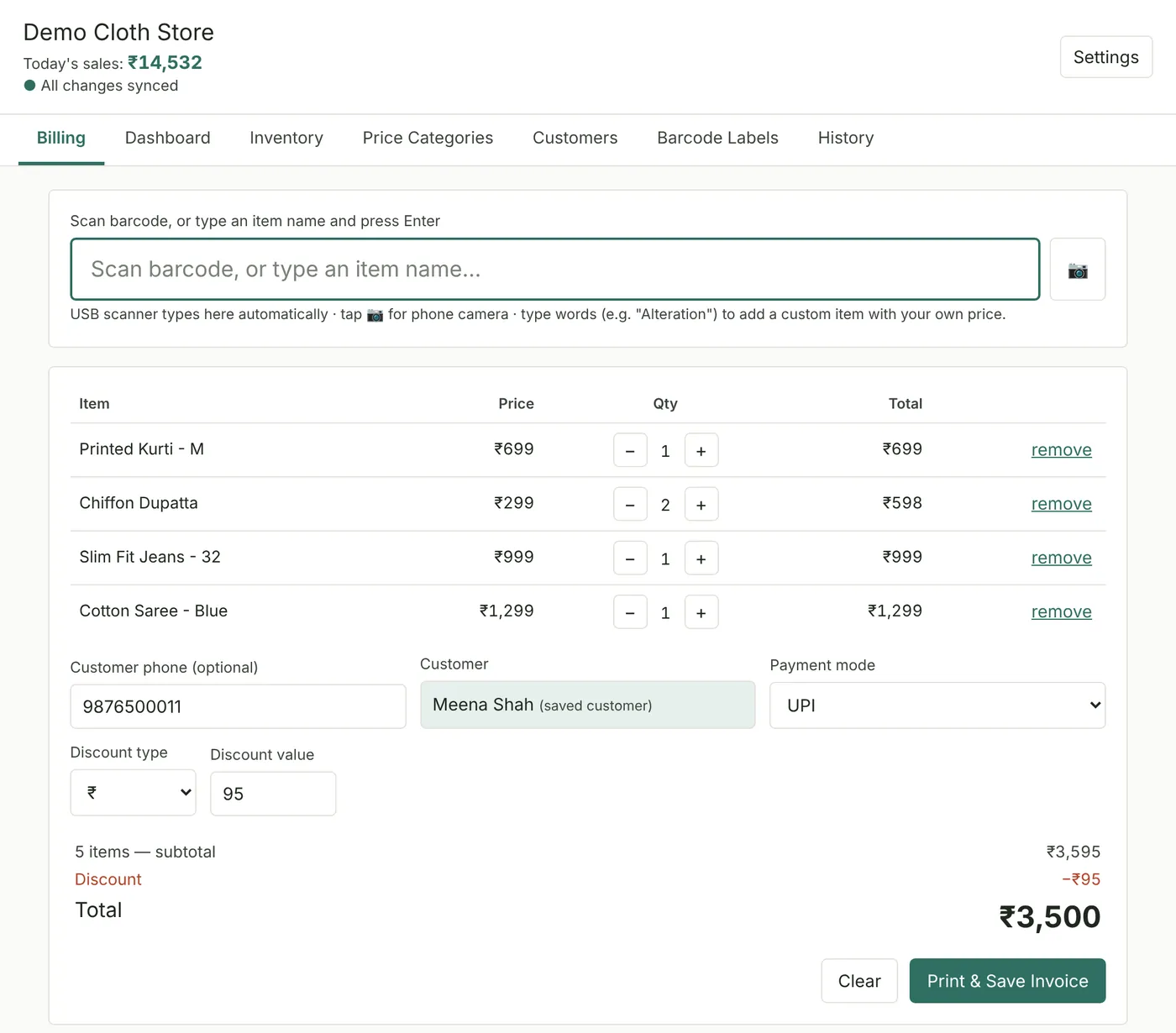
Billing counter
Bill a customer in seconds.
One screen for the whole sale. Scan or type items, change quantities, give a discount in % or ₹ and choose Cash, UPI, Card or Other. Charging for an alteration? Type it and set your own price.
- Warns when stock runs short
- Recognises returning customers by phone number
- Big, simple controls for any staff
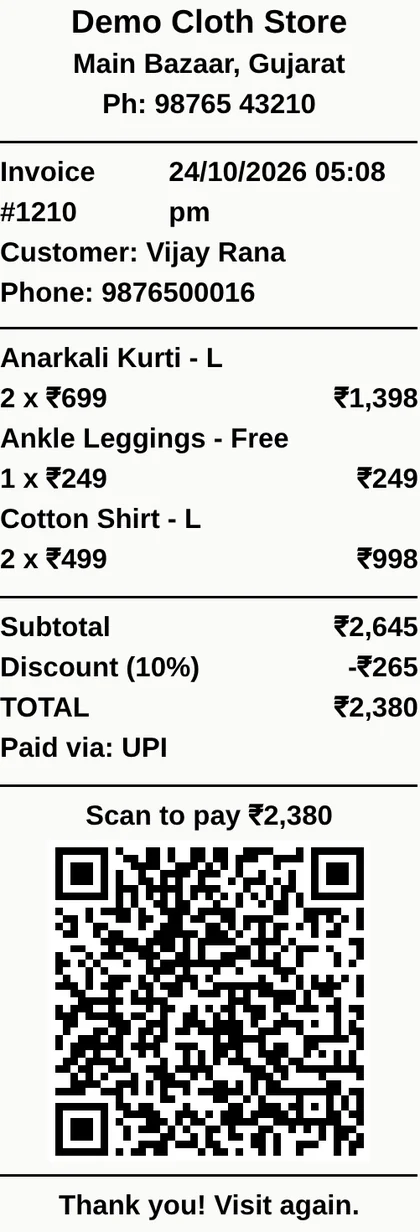
Receipts
Receipts customers can pay from.
Clean 48 mm thermal receipts with your shop name, address, phone and logo. Each one carries a UPI QR code for the exact bill amount: the customer scans and pays, with nothing to type.
- Discount and payment mode printed
- Reprint any bill from History
- Automatic invoice numbers
Offline-first
Power cut? Keep billing.
Every bill is saved on the device first, then synced to the cloud when the connection is back. If the power goes in the middle of a bill, the unfinished bill is still there when you reopen the app.
- Sync status always on screen
- Several phones and counters stay in step
- Install it like an app on a phone or PC
The sync status is always on screen, so staff know exactly where every bill is.
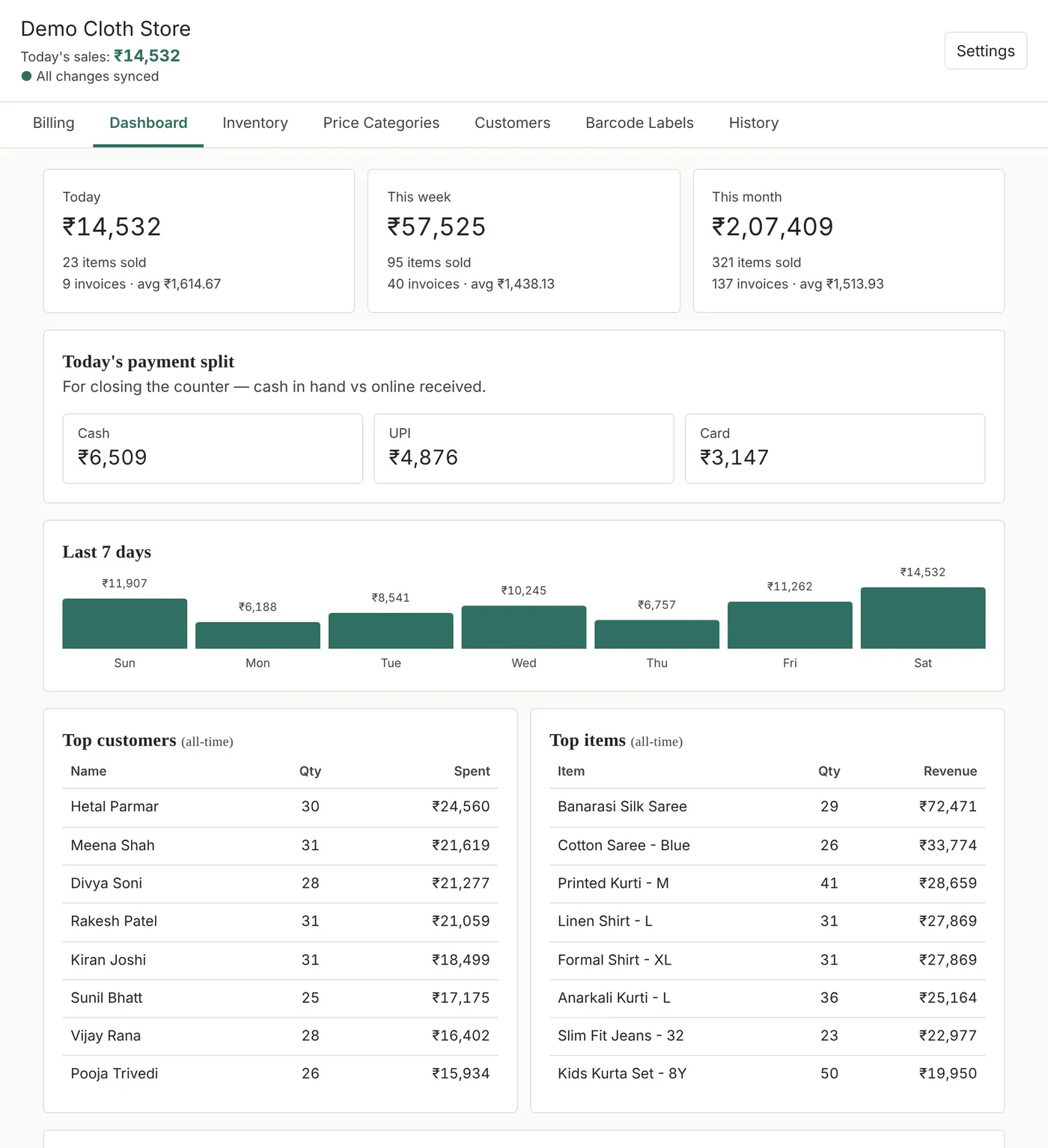
Dashboard
Know your numbers at closing time.
Sales for today, this week and this month, with items sold and average bill. Today's payment split shows cash in hand against online payments, ready for closing the counter.
- Last 7 days at a glance
- Top customers and best-selling items
- Discounts given and low-stock count
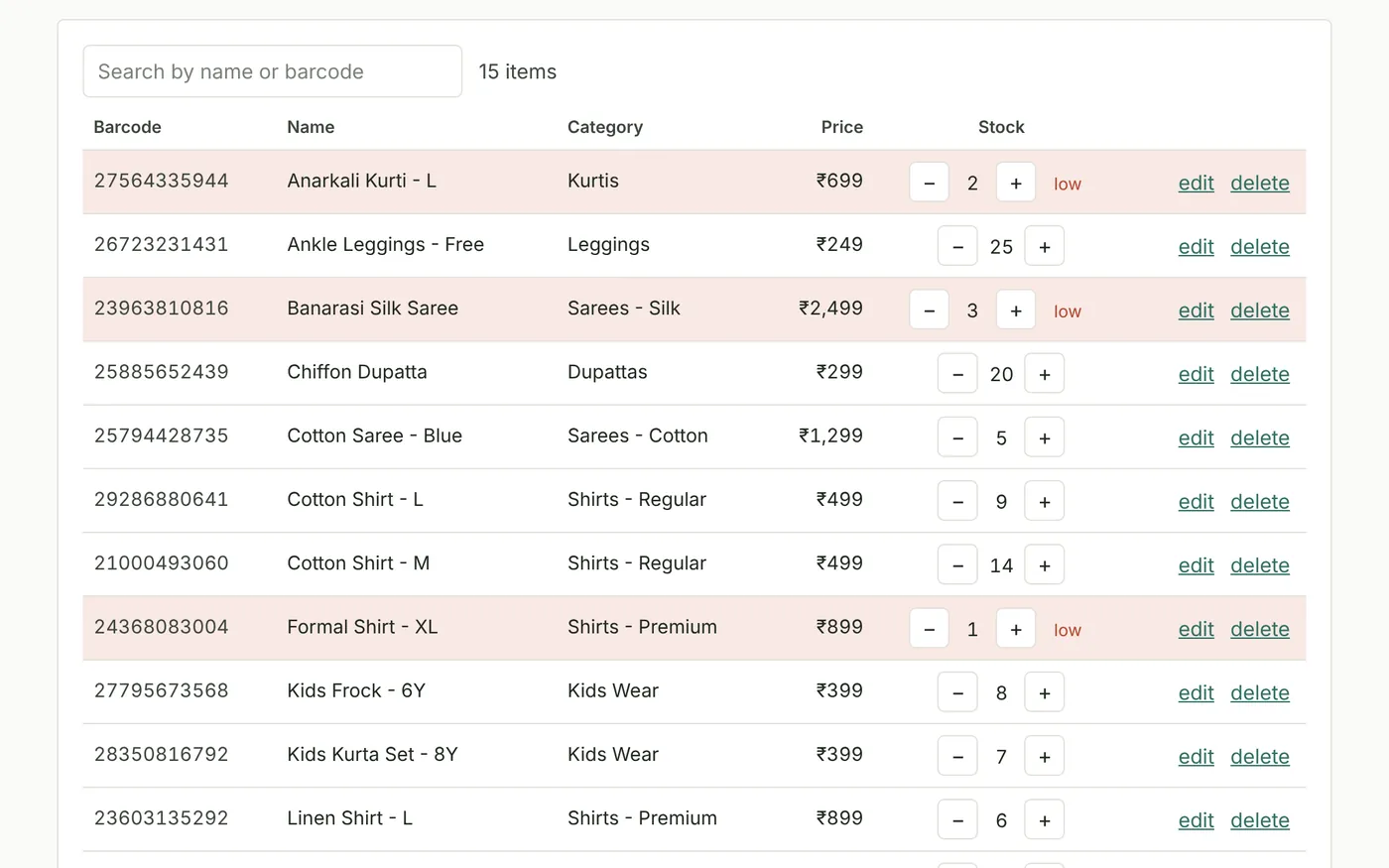
Stock & price categories
Stock that updates itself.
Every sale reduces stock automatically, and items running low are highlighted. Group items into price categories: pick a category and the price fills itself.
- Adjust stock with + and −
- Search by name or barcode
- Set your own low-stock level
Barcode labels
Barcodes for everything you sell.
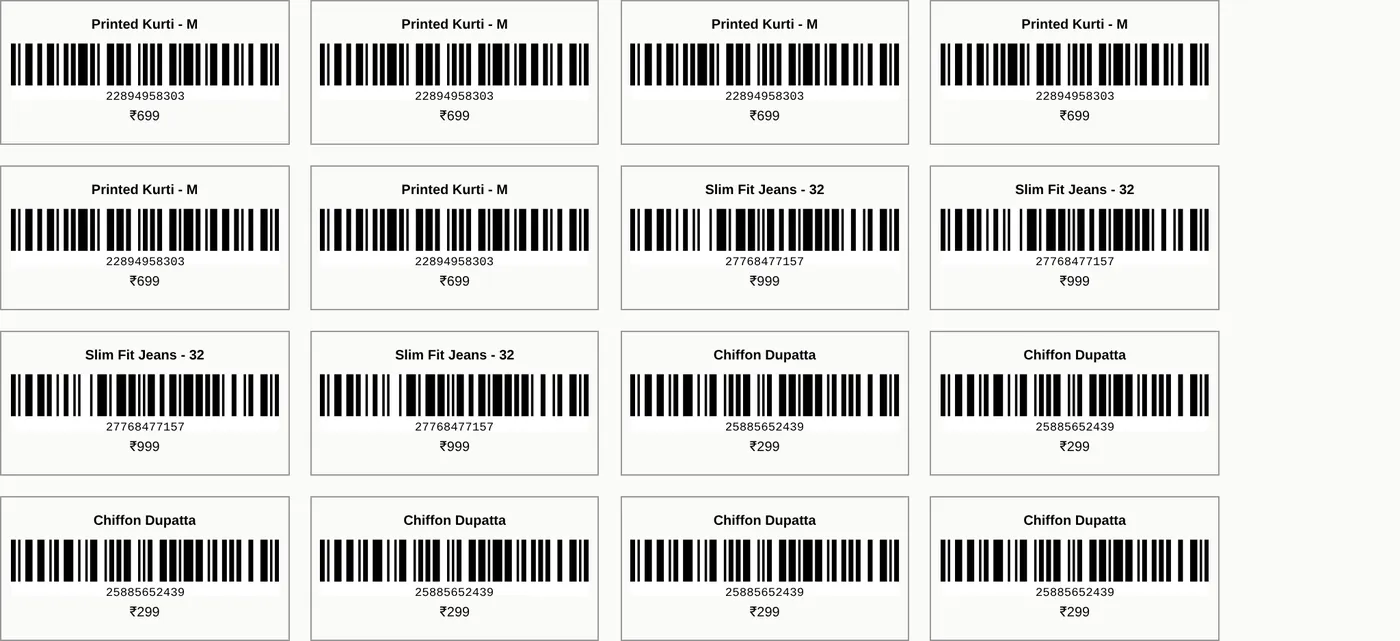
Clothing often arrives without barcodes. Generate one for each item, queue the labels you need and print an A4 sheet with name, code and price, ready for your label printer or print shop.
- Choose how many copies of each
- Works with any USB barcode scanner
- Or scan with a phone camera
Customers & history
Know your regulars.
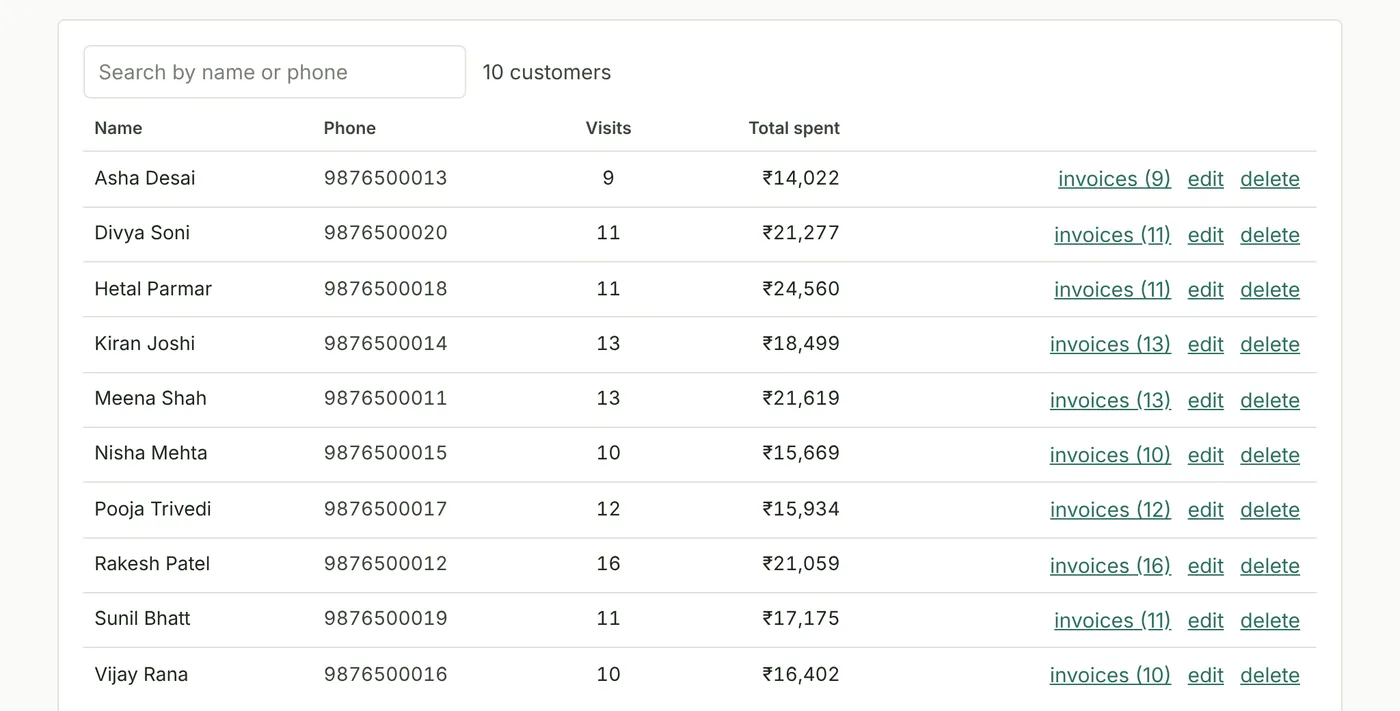
Customers are saved from bills automatically by phone number. See visits, total spent and every invoice for each one, and find any old bill in seconds.
- Search by name or phone
- Full invoice history per customer
- Reprint any bill
Also included
The details that make it dependable.
USB or camera scanning
Use a USB barcode scanner, or the camera of any phone.
Bill history
Search by invoice number, customer name or phone, and reprint.
Survives power cuts
The bill in progress is kept even if the power goes.
Live cloud sync
Every device signed in to the shop stays up to date.
Shop settings
Shop name, address, phone, logo, UPI ID and low-stock level.
Private sign-in
Sign-in required, and new accounts need your shop passcode.
Any device
Runs in the browser on phones, tablets and PCs, and installs like an app.
Backup files
Download a backup of all your data in one click, and restore it any time.
Why Three9 Billing
Made for a real shop counter.
Built with a working clothing store for the problems small shops actually face: unreliable power and internet, stock without barcodes and busy counters.
Never lose a bill
Saved on the device first, synced later. Power cuts and outages don't wipe your sales.
No new hardware needed
Any phone works as a barcode scanner. Add a USB scanner and a small thermal printer if you like.
Get paid faster
Every receipt has a UPI QR for the exact amount, so customers pay in seconds.
Made for clothing stores
Price categories, your own barcode labels and custom items like alterations.
Simple for any staff
One screen to bill, clear buttons and nothing to install.
Your data, backed up
Live cloud sync, plus backup files you can keep.
What do I need to use it?
A phone, tablet or computer with a web browser. A USB barcode scanner and a small thermal receipt printer (48 mm print width) are optional: a phone camera can scan barcodes too.
Does it work without internet?
Yes. After the first sign-in on a device, every bill is saved on that device and syncs to the cloud when the connection comes back.
Can more than one counter or phone use it?
Yes. Every device signed in to your shop sees the same stock, bills and customers, updated live.
My products don't have barcodes. Is that a problem?
No. Generate a barcode for each item in the app and print label sheets. You can also bill by typing the item name.
Does it make GST invoices?
Not at the moment. Three9 Billing prints simple retail receipts. If you need GST invoices, tell us and we can discuss it.
Is my data safe?
Only signed-in staff can open your shop, and new accounts need your shop passcode. Data is kept on your device and in a secure cloud database, and you can download a full backup file at any time.
Is it only for clothing stores?
It's built for clothing stores, with price categories and barcode labels, but it works for any small shop that sells tagged items.
Book a demo
See Three9 Billing in action.
We'll show you Three9 Billing with sample data, from scanning to the receipt, and help you get set up with your own items.
- Emailinfo@three9.in
- WhatsApp+91 63599 33939
- US phone+1 (743) 962-3939
- India phone+91 63599 33939